サーバーを15.0-RELEASE-p1に上げてみた
このサイトはConoHa VPSで動かしているのだが、14.2-RELEASE-p3まで上げた所で止まっていたので、15.0-RELEASE-p1に上げることにした。
BSDの基本は「make depend && make && make install一発」なのだが、FreeBSDにおいてはColin Percival氏による論文「An Automated Binary Security Update System for FreeBSD」を元にしたFreeBSD Updateというバイナリアップデートの機構が整っている。これは各リリースが保持しているファイルのハッシュ値がupdate*.freebsd.orgというDBサーバーに格納して、ローカルファイルのハッシュ値と比較して必要なバイナリdiffを当てるようになっている。仕組み上カスタムしていないカーネルとユーザーランドでしか利用できないが、カーネルのモジュール化が進んだ現代ではカスタムビルドをする人はそうそういないでしょう。FreeBSD 12まではVNET使うのにカスタムカーネルが必要だったけれど。
で、FreeBSD Updateで15.0-RELEASEに上げるための注意点は、FreeBSD 15.0-RELEASE Installation InstructionsのUpgrading Using "FreeBSD Update"セクションのImportant囲みにある。
This step is essential, as upgrading to 15.0-RELEASE without applying the FreeBSD-EN-25:18.freebsd-update errata update will result in an inoperative system!

この手順は重要です。FreeBSD-EN-25:18.freebsd-update 設計ミスの修正を適用せずに15.0-RELEASEにアップグレードすると、システムが動作しなくなります。
これを知らずにアップグレードすると、カーネル更新後の最初のfreebsd-update installで
root@localhost:~ # freebsd-update install
src component not installed, skipped
Creating snapshot of existing boot environment... done.
Installing updates...ld-elf.so.1: Shared object "libsys.so.7" not found, required by "libc.so.7"
ld-elf.so.1: Shared object "libsys.so.7" not found, required by "libc.so.7"
ld-elf.so.1: Shared object "libsys.so.7" not found, required by "libc.so.7"
ld-elf.so.1: Shared object "libsys.so.7" not found, required by "libc.so.7"
(略)
ぎゃー!!
「ld-elf.so.1: Shared object "libsys.so.7" not found, required by "libc.so.7"」で調べるとFreeBSD Bugzillaの289769 と291344が引っかかった。 意訳すると
- 289769: 14.3-RELEASEから15.0-ALPHA3にfreebsd-update installできない→freebsd-updateがライブラリを辞書順にインストールしてたから。ライブラリファイルのインストールをlibsys,libc,libthr,残りに強制するよ。
- 291344: バグを修正し、ENを公開、アップグレード前に既存のシステムを最新のパッチレベルにアップデートする必要があることも明確に文書化、とすでにできる限りの事はしたので、ドキュメントを読んで推奨手順に従って。
...見落としてた。該当のENはFreeBSD-EN-25:18.freebsd-updateで
- 14.3-RELEASE-p4
- 14.2-RELEASE-p7
- 13.5-RELEASE-p5
に適用される。14.0はENが発行された2025-09-30時点でEOLを過ぎているのでパッチがない。中間点なので14.2,14.3どちらに上げても大差ないが、14系最新の14.3にする。
現状の環境から更新はできるが、変な要素が含まれるのを嫌ってテンプレートで提供されている14.0-RELEASEから更新することにする。webサービス自体はJailでコンテナにしているのでOSのアップグレードの影響は小さい。(FreeBSD 12の時はFreeBSD 11以前のJailが動かなくなって酷い目に遭ったが)
1./etc, /usr/local/etc, /root, /home をバックアップする。
2.サーバーを停止する。OS側でshutdownしてもConoHaコントロールパネルに反映されなかったので、ConoHaコントロールパネルで停止する。

3.1.があるので不要だけれど、一応イメージ保存でバックアップする。
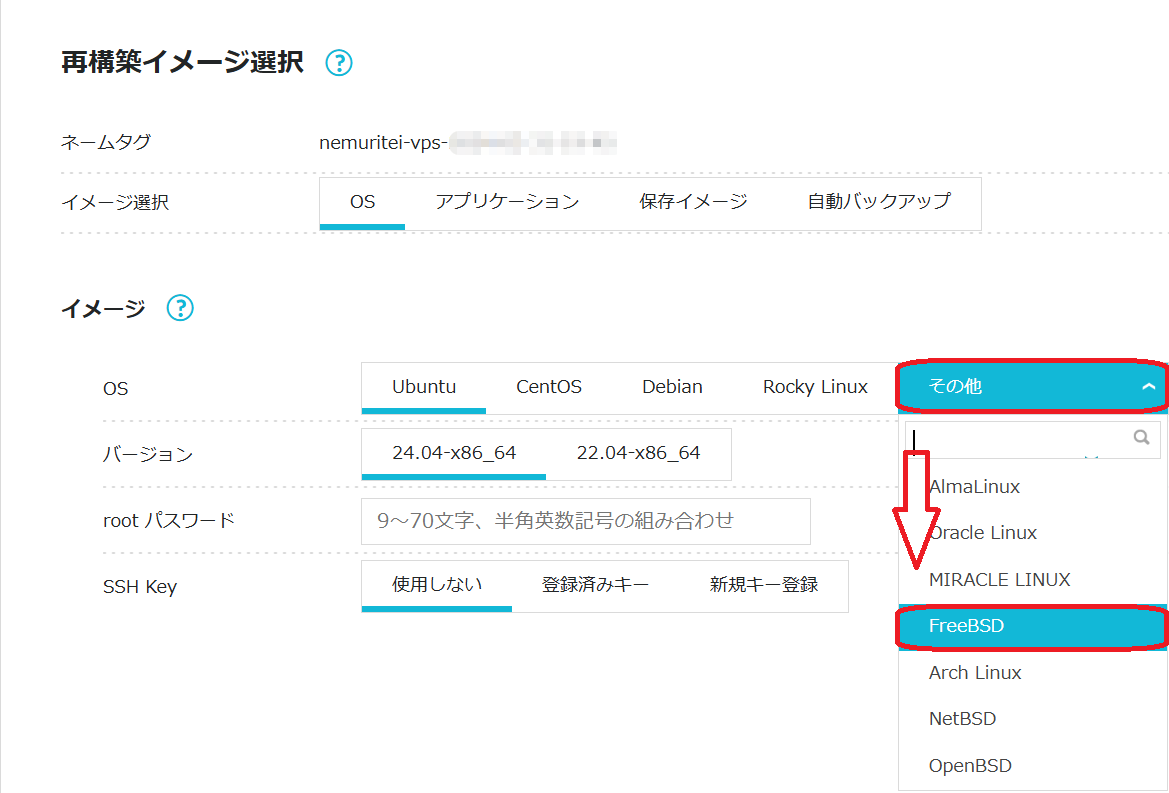
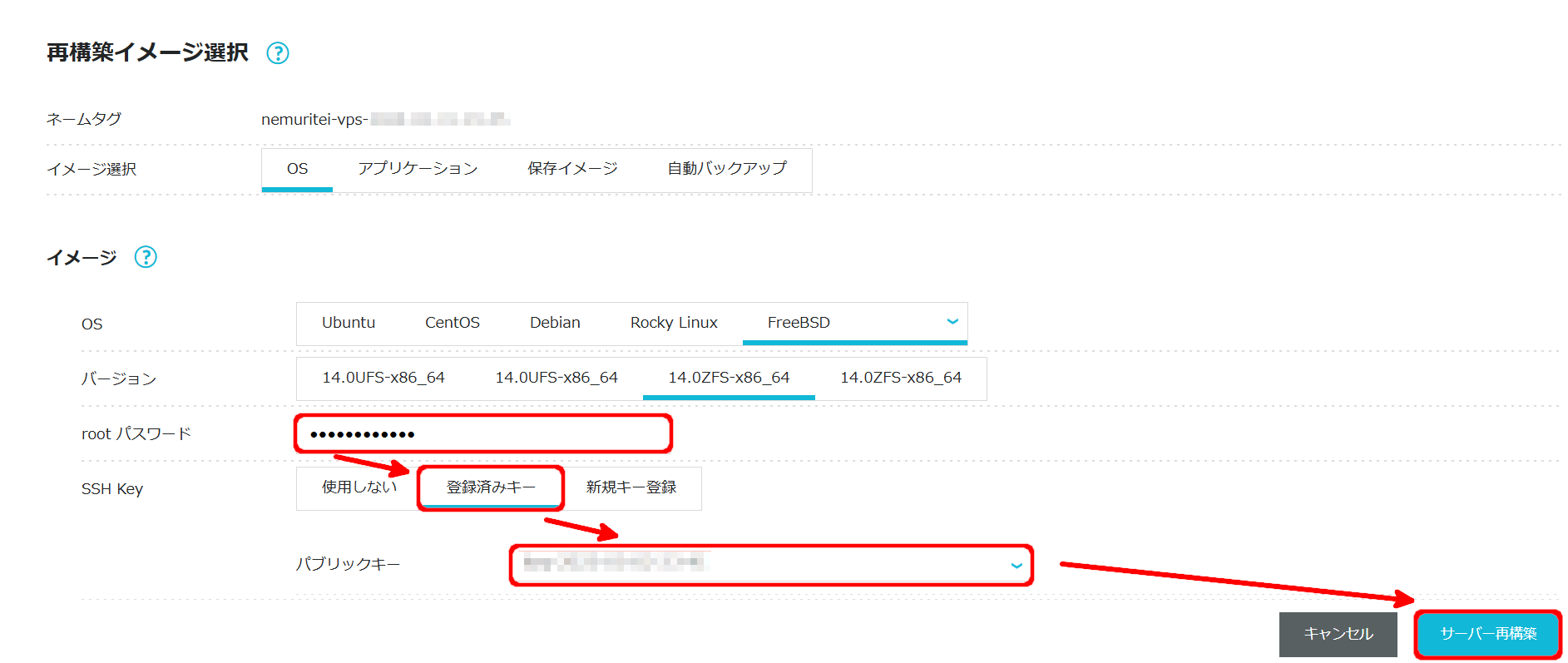
 4.サーバーの再構築を実施する。OSはその他→FreeBSD、バージョンは14.0ZFS-x86_64を選択する。バージョンの項目が2つずつあるのはかつて13.2も公開されていた名残。
 rootパスワードは適切に入力する。SSH Keyは今まで稼働していたので使っていたのがあるので登録済みキーから選択する。使用しないは論外だし、新規キー登録だとクライアント側も更新する必要がある。入力終わったらサーバー構築ボタンをクリックする。
 5.サーバーの再構築が完了したら、サーバーを起動する。

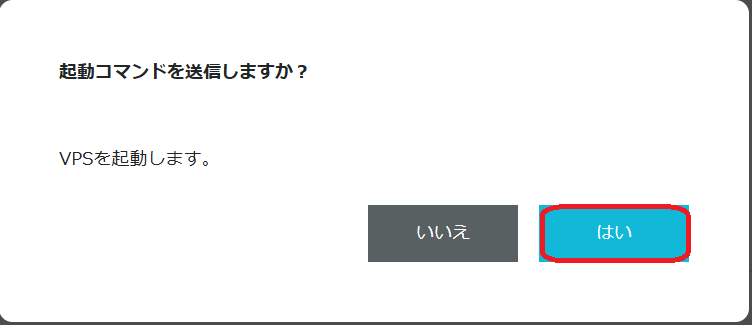
起動コマンド送信の確認がされるのではいをクリックする。
コンソールで起動を確認して。rootでログインする。
6.14.3-RELEASEにアップデートする。まずはパッチファイルの取り込み。rootでfreebsd-update upgrade -r 14.3-RELEASE
root@localhost:~ # freebsd-update upgrade -r 14.3-RELEASE
src component not installed, skipped
Looking up update.FreeBSD.org mirrors... 3 mirrors found.
Fetching public key from update1.freebsd.org... done.
Fetching metadata signature for 14.0-RELEASE from update1.freebsd.org... done.
Fetching metadata index... done.
Fetching 2 metadata files... done.
Inspecting system... done.

The following components of FreeBSD seem to be installed:
kernel/generic kernel/generic-dbg world/base world/lib32

The following components of FreeBSD do not seem to be installed:
world/base-dbg world/lib32-dbg

Does this look reasonable (y/n)?
インストールされているコンポーネント:
- kernel/generic
- kernel/generic-dbg
- world/base
- world/lib32
インストールされていないコンポーネント:
- world/base-dbg
- wrold/lib32-dbg
この構成は正しいか? と聞かれるのでyで先に進む。運用にデバッグコンポーネントは不要だし。
Fetching metadata signature for 14.3-RELEASE from update1.freebsd.org... done.
Fetching metadata index... done.
Fetching 1 metadata patches. done.
Applying metadata patches... done.
Fetching 1 metadata files... done.
Inspecting system... done.
Fetching files from 14.0-RELEASE for merging... done.
Preparing to download files... done.
Fetching 5581 patches.....10....20....(略)....5580 done.
Applying patches... done.
Fetching 5681 files... ....10....20....(略)....5680 done.
Attempting to automatically merge changes in files... done.
ファイルのダウンロードが済むとetcupdateが走る
The following changes, which occurred between FreeBSD 14.0-RELEASE and
FreeBSD 14.3-RELEASE have been merged into /etc/ssh/sshd_config:
--- current version
+++ new version
@@ -103,11 +103,11 @@
 #PidFile /var/run/sshd.pid
 #MaxStartups 10:30:100
 #PermitTunnel no
 #ChrootDirectory none
 #UseBlacklist no
-#VersionAddendum FreeBSD-20231004
+#VersionAddendum FreeBSD-20250219

 # no default banner path
 #Banner none

 # override default of no subsystems
Does this look reasonable (y/n)?
VersionAddendumが増えただけだのでyを押す。
The following files will be removed as part of updating to
14.3-RELEASE-p7:
/boot/kernel/iwlwifi-3160-17.ucode.ko
/boot/kernel/iwlwifi-3168-29.ucode.ko
(略)
14.3-RELEASE-p7への更新で不要になったファイルのリストがmoreで表示される。qを押す。
The following files will be added as part of updating to
14.3-RELEASE-p7:
/boot/kernel/bnxt_re.ko
/boot/kernel/gpioaei.ko
(略)
14.3-RELEASE-p7への更新で新規追加されるファイルのリスト。qを押す。
The following files will be updated as part of updating to
14.3-RELEASE-p7:
/bin/[
/bin/cat
(略)
14.3-RELEASE-p7への更新で更新されるファイルのリスト。qを押す。
To install the downloaded upgrades, run "/usr/sbin/freebsd-update install".
変更の一覧が終わったらインストールを促されるのでfreebsd-update installでパッチファイルをインストールする。
root@localhost:~ # freebsd-update install
src component not installed, skipped
Installing updates...
Kernel updates have been installed.  Please reboot and run
"/usr/sbin/freebsd-update install" again to finish installing updates.
カーネルを更新したので、OSを再起動後再度freebsd-update installを実行せよと。
現在のFreeBSDのバージョンをfreebsd-version -kruで確認すると
root@localhost:~ # freebsd-version -kru
14.3-RELEASE-p7
14.0-RELEASE
14.0-RELEASE
一番上のk(カーネル)だけ14.3になっているのがわかる。
そしてOS再起動rebootぺちっ。
Last login: Fri Jan  2 00:28:06 2026 from ********
FreeBSD 14.3-RELEASE-p7 GENERIC

Welcome to FreeBSD!

Release Notes, Errata: https://www.FreeBSD.org/releases/
Security Advisories:   https://www.FreeBSD.org/security/
FreeBSD Handbook:      https://www.FreeBSD.org/handbook/
FreeBSD FAQ:           https://www.FreeBSD.org/faq/
Questions List:        https://www.FreeBSD.org/lists/questions/
FreeBSD Forums:        https://forums.FreeBSD.org/

Documents installed with the system are in the /usr/local/share/doc/freebsd/
directory, or can be installed later with:  pkg install en-freebsd-doc
For other languages, replace "en" with a language code like de or fr.

Show the version of FreeBSD installed:  freebsd-version ; uname -a
Please include that output and any error messages when posting questions.
Introduction to manual pages:  man man
FreeBSD directory layout:      man hier

To change this login announcement, see motd(5).
root@localhost:~ #
起動メッセージが14.3-RELEASE-p7に変わっている。freebsd-version -kruでバージョン確認。
root@localhost:~ # freebsd-version -kru
14.3-RELEASE-p7
14.3-RELEASE-p7
14.0-RELEASE
真ん中のrはsysctl -n kern.osreleaseの結果らしいので再起動で新しいカーネルが実行されるようになったので変わったのだろう。
次はユーザーランドの更新。言われてたようにfreebsd-update install実行
root@localhost:~ # freebsd-update install
src component not installed, skipped
Installing updates...
Restarting sshd after upgrade
Performing sanity check on sshd configuration.
Stopping sshd.
Waiting for PIDS: 755.
Performing sanity check on sshd configuration.
Starting sshd.
 done.
root@localhost:~ #
すんなり終わる。またバージョン確認
root@localhost:~ # freebsd-version -kru
14.3-RELEASE-p7
14.3-RELEASE-p7
14.3-RELEASE-p7
root@localhost:~ #
最下行のu(ユーザーランド)が更新されたことが確認できた。 本来ならここでpkgの更新をするべきなのだが、すぐ15.0に上げるので省略する。一応何が入っているか確認。
root@localhost:~ # pkg info
gettext-runtime-0.22_1         GNU gettext runtime libraries and programs
indexinfo-0.3.1                Utility to regenerate the GNU info page index
jq-1.7_2                       Lightweight and flexible command-line JSON processor
libedit-3.1.20221030,1         Command line editor library
libevent-2.1.12                API for executing callback functions on events or timeouts
libffi-3.4.4                   Foreign Function Interface
mpdecimal-2.5.1                C/C++ arbitrary precision decimal floating point libraries
ntp-4.2.8p17_1                 The Network Time Protocol Distribution
oniguruma-6.9.8_1              Regular expressions library compatible with POSIX/GNU/Perl
perl5-5.34.3_3                 Practical Extraction and Report Language
pkg-1.20.8                     Package manager
python-3.9_3,2                 "meta-port" for the default version of Python interpreter
python3-3_3                    Meta-port for the Python interpreter 3.x
python39-3.9.18                Interpreted object-oriented programming language
readline-8.2.1                 Library for editing command lines as they are typed
7.14.3-RELEASE-p7に更新できたので6.の手順を15.0-RELEASEに対して実施。まずはfetch。freebsd-update upgrade -r 15.0-RELEASE。Does this look reasonable (y/n)?`は当然yで
root@localhost:~ # freebsd-update upgrade -r 15.0-RELEASE
src component not installed, skipped
Looking up update.FreeBSD.org mirrors... 3 mirrors found.
Fetching metadata signature for 14.3-RELEASE from update1.freebsd.org... done.
Fetching metadata index... done.
Fetching 1 metadata patches. done.
Applying metadata patches... done.
Fetching 1 metadata files... done.
Inspecting system... done.

The following components of FreeBSD seem to be installed:
kernel/generic kernel/generic-dbg world/base world/lib32

The following components of FreeBSD do not seem to be installed:
world/base-dbg world/lib32-dbg

Does this look reasonable (y/n)? y

Fetching metadata signature for 15.0-RELEASE from update1.freebsd.org... done.
Fetching metadata index... done.
Fetching 1 metadata patches. done.
Applying metadata patches... done.
Fetching 1 metadata files... done.
Inspecting system... done.
Fetching files from 14.3-RELEASE for merging... done.
Preparing to download files... done.
Fetching 6732 patches.....10....20....(略)....6730. done.
Applying patches... done.
Fetching 889 files... ....10....20....(略)....880.... done.
Attempting to automatically merge changes in files... done.

The following file could not be merged automatically: /etc/ssh/sshd_config
Press Enter to edit this file in /usr/bin/vi and resolve the conflicts
manually...
/etc/ssh/sshd_configが自動マージできなかったのでEnterを押してviで衝突を解決してくれ、だって。Enterで衝突を確認すると
<<<<<<< current version
# Change to no to disable PAM authentication
KbdInteractiveAuthentication no
=======
# Change to "no" to disable keyboard-interactive authentication.  Depending on
# the system's configuration, this may involve passwords, challenge-response,
# one-time passwords or some combination of these and other methods.
# Keyboard interactive authentication is also used for PAM authentication.
#KbdInteractiveAuthentication yes
>>>>>>> 15.0-RELEASE
コメントと設定が一緒になっていてどうしたらよいか判断できなかったって奴だな。コメントは15.0のを採用。設定は15.0のデフォルトだとKbdInteractiveAuthentication yesとなってSSHのキーボードインタラクティブ認証が有効になる。ブルートフォース攻撃の温床になるではないか。公開鍵での認証し課しないのでnoだ。current versionの設定を切り取って#KbdI...に上書き。パッチの余計な情報を削りZZで抜ける。
>>>>>>
>>>>>>The following changes, which occurred between FreeBSD 14.0-RELEASE and
FreeBSD 15.0-RELEASE have been merged into /etc/ssh/sshd_config:
--- current version
+++ new version
@@ -1,6 +1,6 @@
-#      $OpenBSD: sshd_config,v 1.104 2021/07/02 05:11:21 dtucker Exp $
+#      $OpenBSD: sshd_config,v 1.105 2024/12/03 14:12:47 dtucker Exp $
Does this look reasonable (y/n)?
自動マージできる範囲の確認がくるのでy。ヘッダーのバージョンと日付が変わっている。
The following files will be removed as part of updating to
15.0-RELEASE-p1:
/.cshrc
/.profile
/boot/kernel/callout_test.ko
(略)
The following files will be added as part of updating to
15.0-RELEASE-p1:
/boot/firmware/iwm3160fw
/boot/firmware/iwm3168fw
(略)
The following files will be updated as part of updating to
15.0-RELEASE-p1:
/COPYRIGHT
/bin/[
(略)
ファイルのリスト3種。q、q、q
To install the downloaded upgrades, run 'freebsd-update [options] install'.
ファイルのフェッチが終わったので促されるままfreebsd-update install。ん、表記に[options]が入るようになったぞ。これがfreebsd-updateを更新した効果か。
root@localhost:~ # freebsd-update install
src component not installed, skipped
Installing updates...
Kernel updates have been installed.  Please reboot and run
'freebsd-update [options] install' again to finish installing updates```
OS再起動か。reboot
Last login: Fri Jan  2 00:29:53 2026 from ********
FreeBSD 15.0-RELEASE (GENERIC) releng/15.0-n280995-7aedc8de6446

Welcome to FreeBSD!

Release Notes, Errata: https://www.FreeBSD.org/releases/
Security Advisories:   https://www.FreeBSD.org/security/
FreeBSD Handbook:      https://www.FreeBSD.org/handbook/
FreeBSD FAQ:           https://www.FreeBSD.org/faq/
Questions List:        https://www.FreeBSD.org/lists/questions/
FreeBSD Forums:        https://forums.FreeBSD.org/

Documents installed with the system are in the /usr/local/share/doc/freebsd/
directory, or can be installed later with:  pkg install en-freebsd-doc
For other languages, replace "en" with a language code like de or fr.

Show the version of FreeBSD installed:  freebsd-version ; uname -a
Please include that output and any error messages when posting questions.
Introduction to manual pages:  man man
FreeBSD directory layout:      man hier

To change this login announcement, see motd(5).
バージョン確認。kernelとrunningが15.0-RELEASEになったことがわかる。15.0-RELEASE-p1にならないのは不明。
root@localhost:~ # freebsd-version -kru
15.0-RELEASE
15.0-RELEASE
14.3-RELEASE-p7
freebsd-update installでユーザーランドの更新
root@localhost:~ # freebsd-update install
src component not installed, skipped
Installing updates...
Restarting sshd after upgrade
Performing sanity check on sshd configuration.
Stopping sshd.
Waiting for PIDS: 788.
Performing sanity check on sshd configuration.
Starting sshd.

Completing this upgrade requires removing old shared object files.
Please rebuild all installed 3rd party software (e.g., programs
installed from the ports tree) and then run
'freebsd-update [options] install' again to finish installing updates.
古いライブラリを使っているサードパーティーのソフトウェアを再構築せよ、との事。この時点のバージョンは
root@localhost:~ # freebsd-version -kru
15.0-RELEASE
15.0-RELEASE
15.0-RELEASE-p1
ユーザーランドが更新されたことがわかる。pkgで管理されているソフトウェアはupgradeサブコマンドで更新できる。
root@localhost:~ # pkg upgrade
pkg: Warning: Major OS version upgrade detected.  Running "pkg bootstrap -f" recommended
Updating FreeBSD-ports repository catalogue...
Fetching meta.conf: 100%    179 B   0.2kB/s    00:01
Fetching packagesite.pkg: 100%   10 MiB  10.7MB/s    00:01
Processing entries: 100%
FreeBSD-ports repository update completed. 36393 packages processed.
Updating FreeBSD-ports-kmods repository catalogue...
Fetching meta.conf: 100%    179 B   0.2kB/s    00:01
Fetching packagesite.pkg: 100%   30 KiB  31.2kB/s    00:01
Processing entries: 100%
FreeBSD-ports-kmods repository update completed. 204 packages processed.
All repositories are up to date.
New version of pkg detected; it needs to be installed first.
The following 1 package(s) will be affected (of 0 checked):

Installed packages to be UPGRADED:
        pkg: 1.20.8 -> 2.4.2 [FreeBSD-ports]

Number of packages to be upgraded: 1

The process will require 14 MiB more space.
14 MiB to be downloaded.

Proceed with this action? [y/N]: n
待て待て待て。メジャーOSバージョンのアップグレードを検知したから、"pkg bootstrap -f"の実行が推奨される、って。
一旦nで抜けてから、pkg bootstrap -f"
pkgがインストールされていないからインストールするか? にy。
root@localhost:~ # pkg bootstrap -f
The package management tool is not yet installed on your system.
Do you want to fetch and install it now? [y/N]: y
Bootstrapping pkg from pkg+https://pkg.FreeBSD.org/FreeBSD:15:amd64/quarterly, please wait...
Verifying signature with trusted certificate pkg.freebsd.org.2013102301... done
Installing pkg-2.4.2...
package pkg is already installed, forced install
Extracting pkg-2.4.2: 100%
pkgが入ったので再度pkg upgrade
root@localhost:~ # pkg upgrade
Updating FreeBSD-ports repository catalogue...
Fetching meta.conf: 100%    179 B   0.2kB/s    00:01
Fetching data.pkg: 100%   10 MiB  10.7MB/s    00:01
Processing entries: 100%
FreeBSD-ports repository update completed. 36393 packages processed.
Updating FreeBSD-ports-kmods repository catalogue...
Fetching meta.conf: 100%    179 B   0.2kB/s    00:01
Fetching data.pkg: 100%   31 KiB  31.2kB/s    00:01
Processing entries: 100%
FreeBSD-ports-kmods repository update completed. 204 packages processed.
All repositories are up to date.
Updating database digests format: 100%
Checking for upgrades (15 candidates): 100%
Processing candidates (15 candidates): 100%
The following 15 package(s) will be affected (of 0 checked):

New packages to be INSTALLED:
        python311: 3.11.13_1 [FreeBSD-ports]

Installed packages to be UPGRADED:
        gettext-runtime: 0.22_1 -> 0.23.1 [FreeBSD-ports]
        indexinfo: 0.3.1 -> 0.3.1_1 [FreeBSD-ports]
        jq: 1.7_2 -> 1.8.1 [FreeBSD-ports]
        libedit: 3.1.20221030,1 -> 3.1.20250104,1 [FreeBSD-ports]
        libffi: 3.4.4 -> 3.5.1 [FreeBSD-ports]
        mpdecimal: 2.5.1 -> 4.0.1 [FreeBSD-ports]
        ntp: 4.2.8p17_1 -> 4.2.8p18_5 [FreeBSD-ports]
        oniguruma: 6.9.8_1 -> 6.9.10 [FreeBSD-ports]
        perl5: 5.34.3_3 -> 5.42.0_1 [FreeBSD-ports]
        python: 3.9_3,2 -> 3.11_3,2 [FreeBSD-ports]
        python3: 3_3 -> 3_4 [FreeBSD-ports]
        python39: 3.9.18 -> 3.9.23 [FreeBSD-ports]
        readline: 8.2.1 -> 8.2.13_2 [FreeBSD-ports]

Installed packages to be REINSTALLED:
        libevent-2.1.12 [FreeBSD-ports] (ABI changed: 'FreeBSD:14:amd64' -> 'FreeBSD:15:amd64')

Number of packages to be installed: 1
Number of packages to be upgraded: 13
Number of packages to be reinstalled: 1

The process will require 202 MiB more space.
65 MiB to be downloaded.

Proceed with this action? [y/N]:
15のパッケージを見つけて、新規が1(Python 3.11)、更新が13、ABI変更に伴う再インストールが1、と。進めて良いか? なのでy
Proceed with this action? [y/N]: y
[1/15] Fetching indexinfo-0.3.1_1~2c29163daf.pkg: 100%    6 KiB   5.9kB/s    00:01
[2/15] Fetching jq-1.8.1~34a02f41f7.pkg: 100%  330 KiB 337.6kB/s    00:01
[3/15] Fetching mpdecimal-4.0.1~f774e949d8.pkg: 100%  157 KiB 160.5kB/s    00:01
[4/15] Fetching python39-3.9.23~f1a05c0489.pkg: 100%   19 MiB  19.5MB/s    00:01
[5/15] Fetching libedit-3.1.20250104,1~d4263d45a8.pkg: 100%  151 KiB 154.3kB/s    00:01
[6/15] Fetching perl5-5.42.0_1~f3be220b12.pkg: 100%   16 MiB  16.6MB/s    00:01
[7/15] Fetching ntp-4.2.8p18_5~3a934cad9b.pkg: 100%    2 MiB   1.8MB/s    00:01
[8/15] Fetching oniguruma-6.9.10~d785fcfbe9.pkg: 100%  253 KiB 259.4kB/s    00:01
[9/15] Fetching libffi-3.5.1~cf2254cd5a.pkg: 100%   46 KiB  47.3kB/s    00:01
[10/15] Fetching readline-8.2.13_2~a9402c98f8.pkg: 100%  408 KiB 417.4kB/s    00:01
[11/15] Fetching python-3.11_3,2~a1ca9222d9.pkg: 100%    1 KiB   1.2kB/s    00:01
[12/15] Fetching python3-3_4~5fb9391f6a.pkg: 100%    1 KiB   1.3kB/s    00:01
[13/15] Fetching gettext-runtime-0.23.1~4f554920a2.pkg: 100%  229 KiB 234.7kB/s    00:01
[14/15] Fetching libevent-2.1.12~ded348d851.pkg: 100%  348 KiB 356.7kB/s    00:01
[15/15] Fetching python311-3.11.13_1~6cf0d88050.pkg: 100%   27 MiB  28.0MB/s    00:01
Checking integrity... done (0 conflicting)
[1/15] Upgrading indexinfo from 0.3.1 to 0.3.1_1...
[1/15] Extracting indexinfo-0.3.1_1: 100%
[2/15] Upgrading gettext-runtime from 0.22_1 to 0.23.1...
[2/15] Extracting gettext-runtime-0.23.1: 100%
[3/15] Upgrading libedit from 3.1.20221030,1 to 3.1.20250104,1...
[3/15] Extracting libedit-3.1.20250104,1: 100%
[4/15] Reinstalling libevent-2.1.12...
[4/15] Extracting libevent-2.1.12: 100%
[5/15] Upgrading libffi from 3.4.4 to 3.5.1...
[5/15] Extracting libffi-3.5.1: 100%
[6/15] Upgrading mpdecimal from 2.5.1 to 4.0.1...
[6/15] Extracting mpdecimal-4.0.1: 100%
[7/15] Upgrading oniguruma from 6.9.8_1 to 6.9.10...
[7/15] Extracting oniguruma-6.9.10: 100%
[8/15] Upgrading jq from 1.7_2 to 1.8.1...
[8/15] Extracting jq-1.8.1: 100%
[9/15] Upgrading perl5 from 5.34.3_3 to 5.42.0_1...
[9/15] Extracting perl5-5.42.0_1: 100%
[10/15] Upgrading ntp from 4.2.8p17_1 to 4.2.8p18_5...
[10/15] Extracting ntp-4.2.8p18_5: 100%
[11/15] Upgrading readline from 8.2.1 to 8.2.13_2...
[11/15] Extracting readline-8.2.13_2: 100%
[12/15] Installing python311-3.11.13_1...
[12/15] Extracting python311-3.11.13_1: 100%
[13/15] Upgrading python3 from 3_3 to 3_4...
[13/15] Extracting python3-3_4: 100%
[14/15] Upgrading python from 3.9_3,2 to 3.11_3,2...
[14/15] Extracting python-3.11_3,2: 100%
[15/15] Upgrading python39 from 3.9.18 to 3.9.23...
[15/15] Extracting python39-3.9.23: 100%
=====
Message from oniguruma-6.9.10:

--
===>   NOTICE:

This port is deprecated; you may wish to reconsider installing it:

Project archived upstream.

It is scheduled to be removed on or after 2026-12-01.
=====
Message from python311-3.11.13_1:

--
Note that some standard Python modules are provided as separate ports
as they require additional dependencies. They are available as:

py311-gdbm       databases/py-gdbm@py311
py311-sqlite3    databases/py-sqlite3@py311
py311-tkinter    x11-toolkits/py-tkinter@py311
=====
Message from python39-3.9.23:

--
===>   NOTICE:

This port is deprecated; you may wish to reconsider installing it:

Upgrade to a newer Python version. 3.9 is in maintenance status and gets security fixes only. End-of-Life: 2025-10. See https://devguide.python.org/versions/.

It is scheduled to be removed on or after 2025-10-31.
ガーッと更新がかかって、更新に伴うお知らせが表示される。重要なのは
- oniguruma portは廃止されて2026-12-01に削除される。代替は無い。
- Python 3.9は2025/10/31にEOLを迎えた。
onigurumaは使っていないしRuby界隈探せば何とかなるだろう。Pythonは3.11がインストールされたし、3.9に依存したパッケージも無いから3.9は削除して良いだろう。pkg delete python39
アンインストールして良いかと聞かれるのでy
root@localhost:~ # pkg delete python39
Checking integrity... done (0 conflicting)
Deinstallation has been requested for the following 1 packages (of 0 packages in the universe):

Installed packages to be REMOVED:
        python39: 3.9.23

Number of packages to be removed: 1

The operation will free 119 MiB.

Proceed with deinstalling packages? [y/N]: y
[1/1] Deinstalling python39-3.9.23...
[1/1] Deleting files for python39-3.9.23: 100%
これでpkg関係のアップグレードが終了したので、freebsd-update installを実行して古いライブラリを消して貰う。
root@localhost:~ # freebsd-update install
src component not installed, skipped
Installing updates... done.
バージョンは
root@localhost:~ # freebsd-version -kru
15.0-RELEASE
15.0-RELEASE
15.0-RELEASE-p1
root@localhost:~
更新をfetchしてみる。
root@localhost:~ # freebsd-update fetch
src component not installed, skipped
Looking up update.FreeBSD.org mirrors... 3 mirrors found.
Fetching metadata signature for 15.0-RELEASE from update2.freebsd.org... done.
Fetching metadata index... done.
Fetching 1 metadata patches. done.
Applying metadata patches... done.
Fetching 2 metadata files... done.
Inspecting system... done.
Preparing to download files... done.

No updates needed to update system to 15.0-RELEASE-p1.
root@localhost:~ #
更新は無いって言われた。でも別のマシンはkernelもrunningも15.0-RELEASE-p1なんだよな...p1でカーネルの再ビルドを要求するのがvmmとzfs。VPSの構成でこの辺りが不要と見做されているのかしら?
8.Webサーバーの復元
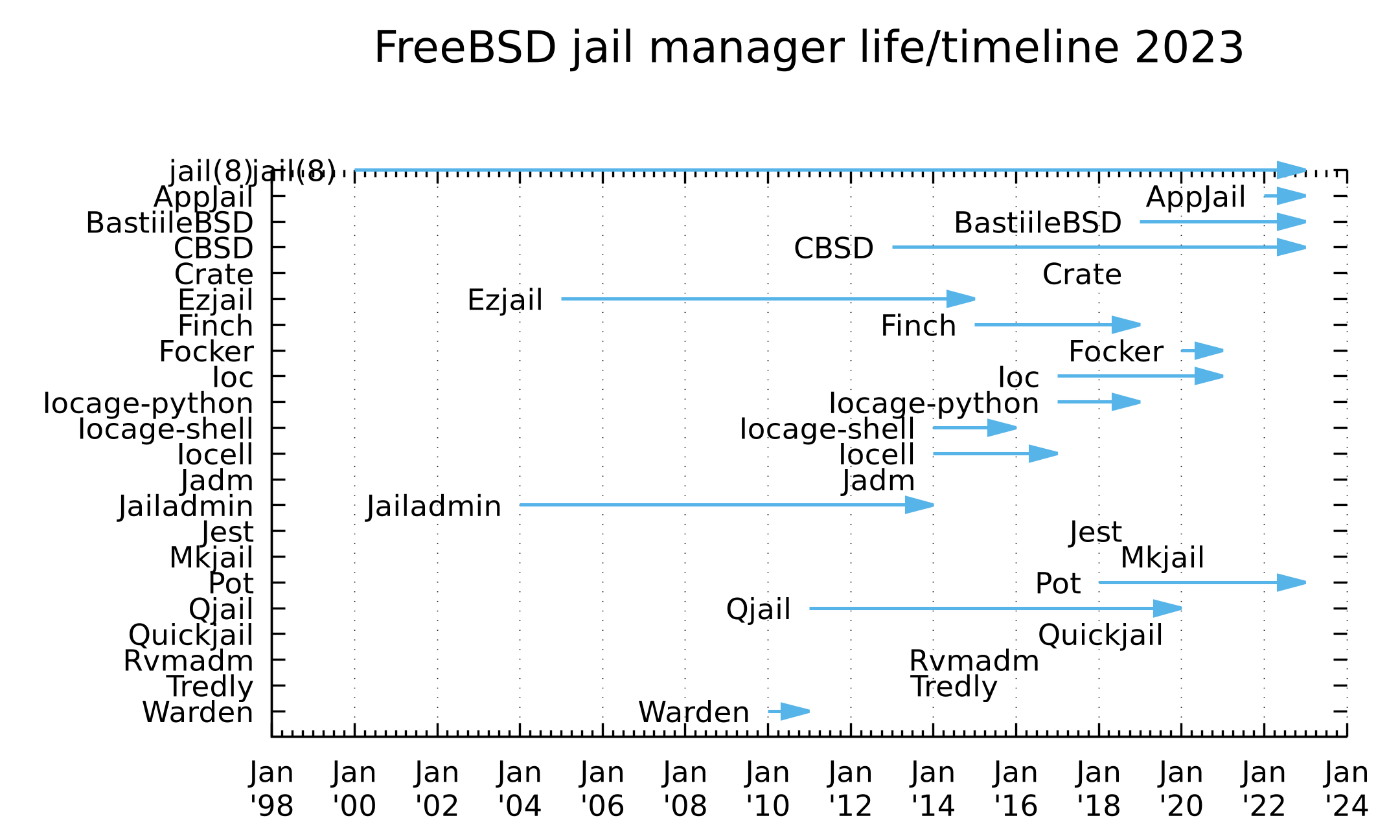
最近のFreeBSDは何でもかんでもJailに追い出せる。Jail管理ソフトウェアの変遷はCBSDのFreeBSD jail manager life/timeline 2023が詳しい。筆者は以前EzjailやQjailを使っていたのだが最近はBastilleBSDに落ち着いた。CBSDは環境作成が難しくて、Potはインターネット環境が多分必須なのよ...
と言うわけで、pkgで必要なパッケージをインストール
root@localhost # pkg install bastille chezmoi doas fish tmux vim
chezmoi以降はオプショナル。個人の好みで。
/usr/local/etc/bastille.conf.sampleを/usr/local/etc/bastille.confにコピーして以下の3項目を変更する。
-bastille_tzdata=""                                                    ## default: empty to use host's time zone
+bastille_tzdata="Asia/Tokyo"                                          ## default: empty to use host's time zone

 ## ZFS options
-bastille_zfs_enable="NO"                                              ## default: "NO"
-bastille_zfs_zpool=""                                                 ## default: ""
+bastille_zfs_enable="YES"                                             ## default: "NO"
+bastille_zfs_zpool="zroot"                                            ## default: ""
バックアップしたJail環境が14.2-RELEASE-p3だったので、bastilleに14.2-RELEASEを用意する。
root@localhost # bastille bootstrap 14.2-RELEASE

Attempting to bootstrap FreeBSD release: 14.2-RELEASE
Unable to fetch MANIFEST. See 'bootstrap urls'.
[ERROR]: Bootstrap failed!
...ちっ。EOLしたからftp-archiveに移動したか。/usr/local/etc/bastille.confのbastille_url_freebsdを以下に書き換える。
-bastille_url_freebsd="http://ftp.freebsd.org/pub/FreeBSD/releases/"                  ## default: "http://ftp.freebsd.org/pub/FreeBSD/releases/"
+bastille_url_freebsd="http://ftp-archive.freebsd.org/pub/FreeBSD-Archive/old-releases/"
再度bootstrap。
root@localhost # bastille bootstrap 14.2-RELEASE

Attempting to bootstrap FreeBSD release: 14.2-RELEASE

Fetching MANIFEST...
/usr/local/bastille/cache/14.2-RELEASE/MANIFES        1046  B 4813 kBps    00s

Fetching distfile: base.txz
/usr/local/bastille/cache/14.2-RELEASE/base.tx         196 MB 2315 kBps 01m27s
****
Validating checksum for archive: base.txz
MANIFEST: e3971a3d4f36ed1ac67d2e7a5501726de79dd3695aa76bfad2a4ebe91a88a134
DOWNLOAD: e3971a3d4f36ed1ac67d2e7a5501726de79dd3695aa76bfad2a4ebe91a88a134

Checksum validated.

Extracting archive: base.txz

Bootstrap successful.
See 'bastille --help' for available commands.
今度は上手くいった。bastille exportでバックアップしていたJailイメージを戻して、importサブコマンドで展開する。
root@localhost # bastille import /usr/local/bastille/backups/www_2026-01-01-223700.txz

Attempting to import jail: www...

Validating file: www_2026-01-01-223700.txz...

File validation successful!

Importing 'www' from compressed .txz archive.
Preparing ZFS environment...
****
Extracting files from 'www_2026-01-01-223700.txz' archive...

Jail: 'www' imported successfully.
これでJail環境が/usr/local/bastille/jails/www/以下に復元された。このまま再開しても良いのだが14系最新の14.3に上げておくか。
/usr/local/etc/bastille.confのbastille_url_freebsdを元に戻した後14.3の環境作成。
root@localhost # bastille bootstrap 14.3-RELEASE
upgradeサブコマンドでwwwコンテナを14.3にする。
root@localhost # bastille upgrade www 14.3-RELEASE

[www]:

Upgraded www: 14.2-RELEASE -> 14.3-RELEASE
See 'bastille etcupdate TARGET' to update /etc
先にbastille etcupdate TARGETしろと叱られた。
root@localhost # bastille etcupdate www

Usage: bastille etcupdate [option(s)] bootstrap RELEASE
                                      TARGET update RELEASE
                                      TARGET diff|resolve

    Options:

    -d | --dry-run     Show output, but do not apply.
    -f | --force       Force a re-bootstrap of a RELEASE.
    -x | --debug       Enable debug mode.
ちっ。
root@localhost # bastille etcupdate www update 14.3-RELEASE

[www]:
[ERROR]: Please run 'bastille etcupdate bootstrap RELEASE' first.
先にbastille etcupdate bootstrap RELEASEしろと。
root@localhost # bastille etcupdate bootstrap 14.3-RELEASE

Attempting to bootstrap etcupdate release: 14.3-RELEASE...
bastille_bootstrap_archives: base -> src
/usr/local/bastille/cache/14.3-RELEASE/src.txz         206 MB 4951 kBps    43s
bastille_bootstrap_archives: src -> base

Building tarball, please wait...

Etcupdate bootstrap complete: 14.3-RELEASE
これでようやくbastille etcupdate TARGET update RELEASEでできる。
root@localhost # bastille etcupdate www update 14.3-RELEASE

[www]:
Running: etcupdate update
  U /etc/autofs/special_media
  U /etc/defaults/periodic.conf
  U /etc/defaults/rc.conf
  U /etc/devd/iwmbtfw.conf
  U /etc/mtree/BSD.debug.dist
  U /etc/mtree/BSD.include.dist
  U /etc/mtree/BSD.tests.dist
  U /etc/mtree/BSD.usr.dist
  U /etc/pkg/FreeBSD.conf
  U /etc/rc.d/iovctl
  U /etc/rc.d/ipfilter
  U /etc/rc.d/kld
  U /etc/rc.d/sendmail
  U /etc/rc.d/var_run
  U /etc/regdomain.xml
  U /etc/services
  U /etc/ssh/moduli
  U /etc/ssh/sshd_config
  A /etc/devd/rtlbtfw.conf
これでwwwコンテナは14.3ベースになった。OSのマイナーアップデートでは基本バイナリの互換が保たれるはず(11.1のようにX window systemの脆弱性対処のためABIを変更した例外もあったが) なのでwebサーバーのNginxとかサードパーティーのソフトウェアはそのままにする。15.0ベースにするなら新規にコンテナを作って差し替えるのがよさそう。
次はbastilleを動かすための前準備としてsetupサブコマンドを実行。
root@localhost # bastille setup
bastille_enable:  -> YES

ZFS has already been configured!

Configuring bastille0 loopback interface
cloned_interfaces:  -> lo1
ifconfig_lo1_name:  -> bastille0

Bringing up new interface: [bastille0]
Created clone interfaces: lo1.
bastille_network_loopback: bastille0 -> bastille0
bastille_network_shared:  ->

Loopback interface successfully configured: [bastille0]

Determined default network interface: (vtnet0)
/etc/pf.conf does not exist: creating...
pf_enable: NO -> YES
pf ruleset created, please review /etc/pf.conf and enable it using 'service pf start'.

Bastille has successfully been configured.
service pf startを実行すると通信が切断されるので、再接続してコンテナ起動
root@localhost # bastille start www
これでWebサービスが立ち上がっているのを確認できた。
以上が14.0-RELEASE->14.3-RELEASE->15.0-RELEASEへの更新手順になる。残念ながら15.0-RELEASEから実験的対応したベースシステムのpkg化は実施されなかった。
ConoHaさんもお知らせに「 【注意喚起】FreeBSDに関するリモートコード実行の脆弱性(CVE-2025-14558)に関するアップデートのお願い」と出す割に
【対策方法】
FreeBSDの最新パッチを適用することで、脆弱性への対策が可能です。
公式セキュリティアドバイザリをご確認いただき、早急なアップデートを推奨いたします。
[FreeBSD セキュリティアドバイザリ](https://securityonline.info/freebsd-network-alert-malicious-ipv6-packets-can-trigger-remote-code-execution-via-resolvconf-cve-2025-14558/)
リンクがDaily CyberSecurityの記事で記事中のexplainのリンクを踏まないと公式のセキュリティアドバイザリFreeBSD-SA-25:12.rtsoldにたどり着けない、対策バージョンが13.5-RELEASE-p8、14.3-RELEASE-p7、15.0-RELEASE-p1で提供されているテンプレートは14.0(その前は13.2)だからユーザーが自力でOSをアップグレードするしか無い、という適当な対応しかできないなら、対応を取りやめればいいのに。(要約: とっとと14.3や15.0のテンプレートを提供せいや)